The room hears the song. Not the answer.
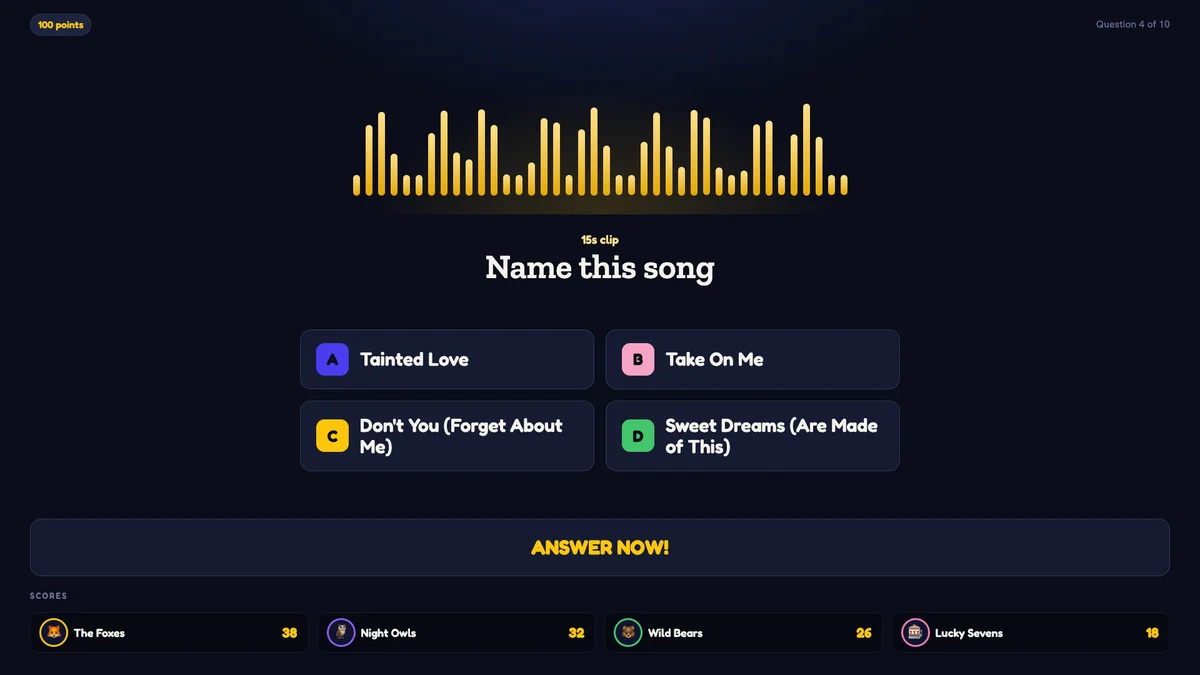
A music round that drops into a normal trivia night. Four titles on the screen, an equaliser where the video would be, and one recognisable riff doing the rest.
- Search a song — Quizado writes the question and the four titles
- No spoiler video — the big screen shows an equaliser instead
- Set the clip length from 8 to 30 seconds
Catch That Tune is our Name That Tune-style music round. Its packs play on every plan. Your own music questions play from Pro. Music playback needs an internet connection, and you hold whatever music licence your venue requires.
Inside Quizado · actual product screen
A question type, not a separate game.
Catch That Tune lives inside Bar Trivia as a question type. Pick it in the editor, find the song, and Quizado writes the rest — the question, the four titles and which one is correct.
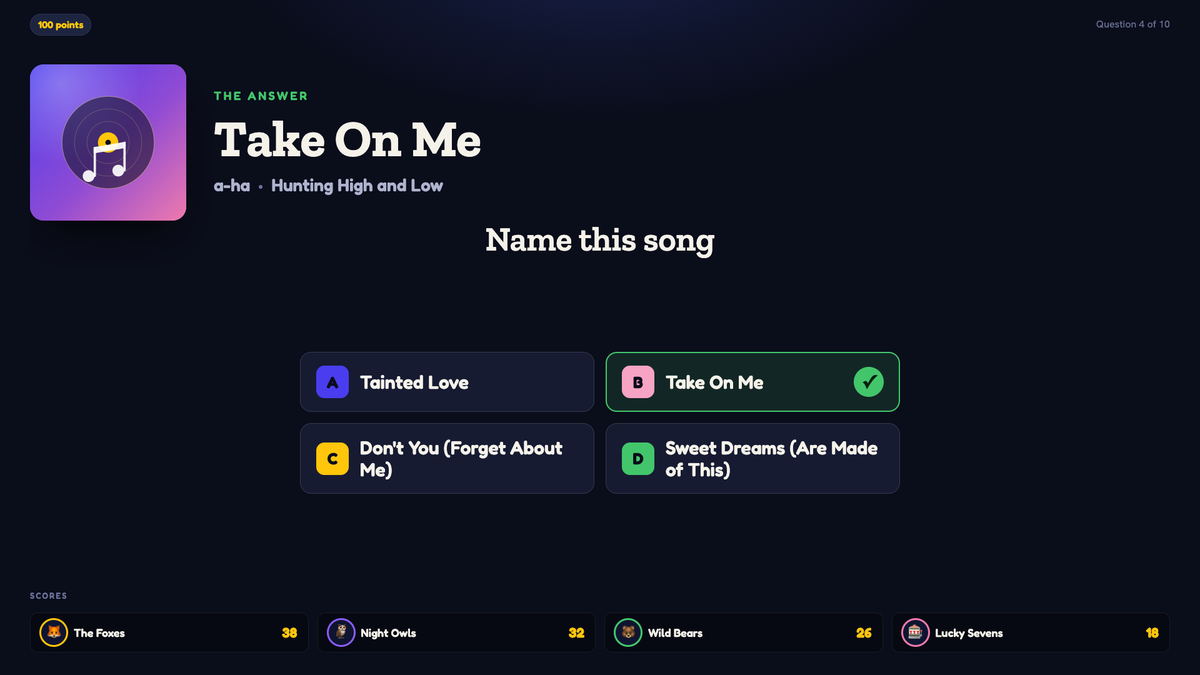
That means a music round drops straight into a normal trivia night. Mix it with your usual rounds, save it to a pack and reuse it, or hand it to the next host on your team. The question is filed under Music automatically, so your library reads "Take On Me — a-ha" instead of a wall of identical entries.
A music question in under a minute.
Search a title or artist
Type a song name or paste a link. Quizado finds the track and the clip.
See what will actually play
Every search result says whether it can play from your region, so nothing dies mid-round.
Take the four titles
Quizado picks the wrong answers, plausible and same-era. Reshuffle them if they read badly.
Set the difficulty
One control — easy plays a recognisable hook, hard plays the intro.
Preview, then save
Hear exactly what the room will hear before anything is saved.
A full-width equaliser, then the reveal.
While the clip plays, the screen shows an equaliser and the four titles. On the reveal, the equaliser collapses and the track takes over the screen: title, artist and album, correct option ticked and the wrong ones dimmed rather than whisked away.
- Cover art only appears on the reveal, never during the clip
- Phones stay silent — audio plays from the host device
- A host-only music dock to scrub and cue
- Works over Zoom or Meet by sharing system audio
Inside Quizado · actual product screen
You already have the playlist.
Paste the link and Quizado turns it into a pack you can build rounds from.
Paste a public playlist
Spotify, Apple Music, Deezer, Tidal or YouTube.
Playable, or needs a fix
The pack shows which every song is, so you know what to swap before the night.
Build a round, hear it first
Pick a question count, difficulty and clip length, and preview anything before you save.
Nothing saves until you say so
Trim the running order, swap a song, or skip it entirely. Then you decide.
Filed under Music
Named after the song, so your library stays readable six months later.
Reuse and hand it on
Save it to a pack and the next host on your team can run the same round.
The music licence is yours, not ours.
You are responsible for holding whatever music licence your venue, event or online quiz requires. Quizado does not provide, include or arrange that licence, and nothing in your subscription covers it. Quizado matches the tracks you choose to streams and plays them through your own device.
- Finds the track and writes the question
- Picks four plausible titles
- Plays the clip through your host device
- Shows an equaliser instead of the video
- Reveals title, artist and album
- Any music licence your venue or event needs
- An internet connection on the night
- Third-party content subject to that platform’s terms
- Checking a track plays in your region
- Music rounds are not available offline
Straight answers.
Do I need a music licence to run a music round?
Yes. You hold whatever licence your venue, event or online quiz requires. Quizado does not provide, include or arrange it.
Which plan includes Catch That Tune?
Catch That Tune packs play on every plan. Your own music questions play from Pro, as part of media questions. You can build the round on any plan.
Can I pick a decade or a genre for the round?
Yes. Build rounds around an era or genre, or paste a playlist you already have.
Where does the music actually play?
From your host device. Player phones stay silent, so the room hears one clean source.
How long is each clip?
Your choice of 8 to 30 seconds, set per round.
What if a song in my playlist will not play?
The pack tells you before the night, so you can swap it. No round dies halfway through.
Is this the official TV show?
No. Catch That Tune is a music round in the same tradition as Name That Tune and Beat the Intro: a clip plays and the teams guess the song from four titles. Nothing here is official Name That Tune material.
Put a music round in next week’s quiz.
Search one song, take the four titles Quizado writes, and hear exactly what the room will hear before you save it.
Needs an internet connection · You hold the music licence