Bingo, but the numbers are songs.
The music bingo app for bars and venues. Play a clip, watch the recognition spread, and wait for someone to call it. Cards live on the phones, in the browser or the free Quizado app, so there is nothing to print and nothing to check by hand.
- Cards on every phone — no paper, no daubers, no printing
- Quizado judges the call — a false BINGO is caught instantly
- Pick the pattern — a line, four corners, or the full card
Build a music bingo round on any plan; hosting it needs Pro or Business. Music playback needs an internet connection, and you hold whatever music licence your venue requires.
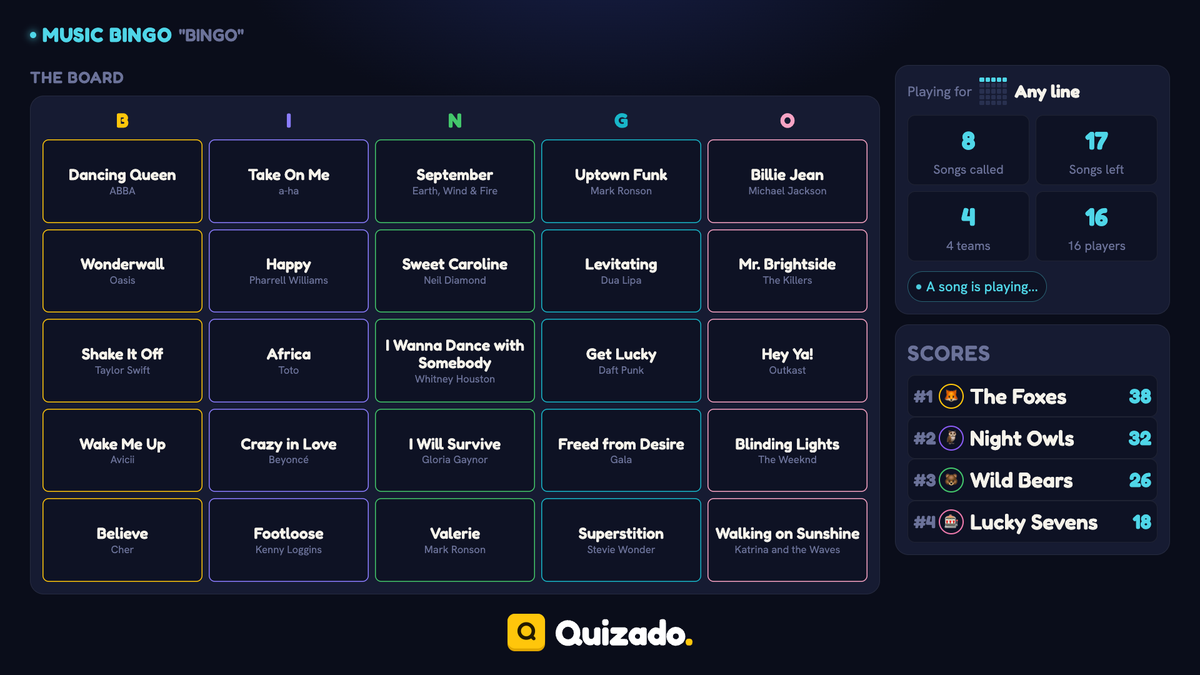
Music Bingo · actual product screen
The easiest room in the building.
Quizado is music bingo software for bars, built as a round type inside Bar Trivia. Instead of a running order of questions, the round holds a pool of songs, and every team gets a bingo card built from that pool. You play short clips; teams mark the songs they hear. First to complete the pattern presses BINGO.
It suits the part of the night where people want to drink and listen rather than argue about capital cities. Nobody is knocked out, everybody has a card, and the room reacts to every track you play.
How to host music bingo in five steps.
Fill the song pool
Search or paste a playlist. Forty tracks is plenty for a 45-minute round.
Deal the cards
Teams join as they would for any game. Each phone generates a card from the pool.
Play the clips
Ten to thirty seconds per song. Quizado marks the pool as it goes and keeps the play order random.
Teams mark their card
Whoever recognises the song taps it. No pens, no arguing over smudged paper.
Check the BINGO
A team calls it, Quizado verifies the card against what has actually played. Valid or false, out loud.
A pool of songs and a pattern. That is the whole setup.
Choose how many songs, how long each clip runs and what counts as a win. Cards can all be the same or scrambled per team, and the finished round saves to a pack you can host again.
- Same card for everyone, or a different one per team
- Line, four corners, or the full card
- Clip length of 8 to 30 seconds
- Automatic mode plays the songs and judges the calls for you
Music Bingo · actual product screen
You play songs. Teams mark what they hear.
Songs come up at random
Your pool, shuffled. Nobody can work ahead from a running order.
Teams mark their own card
Tap the song you heard. Quizado remembers what has played and what has not.
The screen gives nothing away
The big screen shows the pattern and the scoreboard in letters the back of the room can read, never a team's card.
Somebody calls BINGO
Quizado checks the card against the songs already played and says valid or false, out loud.
Then play for the next one
Carry on for a second pattern, or bank it and move into your next trivia round.
Or let it run itself
Automatic mode plays the clips, judges the calls and keeps the round moving while you work the room.
The music licence is yours, not ours.
You are responsible for holding whatever music licence your venue, event or online quiz requires. Quizado does not provide, include or arrange that licence, and nothing in your subscription covers it. Music bingo also needs an internet connection — both for playback and for the cards on players’ phones.
- Builds the pool and deals the cards
- Keeps the play order random
- Marks what has played
- Verifies every BINGO call
- Runs the round automatically if you want
- Any music licence your venue or event needs
- An internet connection for playback and cards
- Third-party content subject to that platform’s terms
- Music bingo is not available offline
- Prizes, and who gets them
Straight answers.
How many songs do I need?
Around forty for a 45-minute round. Fewer songs means faster BINGOs and a shorter round.
Do teams need paper cards?
No. Every card lives on a phone, which is also what lets Quizado verify a call instantly.
Can a team cheat by calling BINGO early?
They can try. Quizado checks the card against the songs that have actually played and announces a false call.
Does everyone get the same card?
Your choice — one shared card for the room, or a scrambled card per team.
How do I host music bingo at a bar?
Music bingo for bars: fill the song pool, pick a pattern and put the round on the bar TV. Teams join on their phones, you or automatic mode play the clips, and Quizado checks every BINGO. Hosting needs the Pro or Business plan and an internet connection.
Which plan includes music bingo?
Pro and Business host it. You can build a round on any plan.
Do I need a music licence?
Yes. You hold whatever licence your venue, event or online quiz requires. Quizado does not provide or arrange it.
Give the room a night it can sing through.
Build a pool of forty songs, pick a pattern and let every phone in the building deal itself a card.
Needs an internet connection · You hold the music licence